
In Part 1, we built a (somewhat useless) mochiweb comet application that sent clients a message every 10 seconds. We tuned the Linux kernel, and built a tool to establish a lot of connections in order to test performance and memory usage. We found that it took around 45KB per connection.
Part 2 is about turning the application into something useful, and saving memory:
- Implement a message router with a login/logout/send API
- Update the mochiweb app to receive messages from the router
- Setup a distributed erlang system so we can run the router on a different node/host to mochiweb
- Write a tool to spam the router with lots of messages
- Graph memory usage over 24hrs, and optimise the mochiweb app to save memory.
This means we are decoupling the message sending logic from the mochiweb app. In tandem with the floodtest tool from part 1, we can benchmark a setup closer to a production scenario.
Implementing the message router
The router API is just 3 functions:
login(Id, Pid)register a process (of pidPid) to receive messages forIdlogout(Pid)to stop receiving messagessend(Id, Msg)sends the messageMsgto any client logged in asId
Note that, by design, it is possible for one process to login with multiple different Ids.
This example router module uses 2 ets tables to store bidirectional mappings between Pids and Ids. (pid2id and id2pid in the #state record below.)
router.erl:
-module(router).
-behaviour(gen_server).

-export([start_link/0]).
-export([init/1, handle_call/3, handle_cast/2, handle_info/2,
     terminate/2, code_change/3]).

-export([send/2, login/2, logout/1]).

-define(SERVER, global:whereis_name(?MODULE)).

% will hold bidirectional mapping between id <--> pid
-record(state, {pid2id, id2pid}).

start_link() ->
    gen_server:start_link({global, ?MODULE}, ?MODULE, [], []).

% sends Msg to anyone logged in as Id
send(Id, Msg) ->
    gen_server:call(?SERVER, {send, Id, Msg}).

login(Id, Pid) when is_pid(Pid) ->
    gen_server:call(?SERVER, {login, Id, Pid}).

logout(Pid) when is_pid(Pid) ->
    gen_server:call(?SERVER, {logout, Pid}).

%%

init([]) ->
    % set this so we can catch death of logged in pids:
    process_flag(trap_exit, true),
    % use ets for routing tables
    {ok, #state{
                pid2id = ets:new(?MODULE, [bag]),
                id2pid = ets:new(?MODULE, [bag])
               }
    }.

handle_call({login, Id, Pid}, _From, State) when is_pid(Pid) ->
    ets:insert(State#state.pid2id, {Pid, Id}),
    ets:insert(State#state.id2pid, {Id, Pid}),
    link(Pid), % tell us if they exit, so we can log them out
    io:format("~w logged in as ~w\n",[Pid, Id]),
    {reply, ok, State};

handle_call({logout, Pid}, _From, State) when is_pid(Pid) ->
    unlink(Pid),
    PidRows = ets:lookup(State#state.pid2id, Pid),
    case PidRows of
        [] ->
            ok;
        _ ->
            IdRows = [ {I,P} || {P,I} <- PidRows ], % invert tuples
            % delete all pid->id entries
            ets:delete(State#state.pid2id, Pid),
            % and all id->pid
            [ ets:delete_object(State#state.id2pid, Obj) || Obj <- IdRows ]
    end,
    io:format("pid ~w logged out\n",[Pid]),
    {reply, ok, State};

handle_call({send, Id, Msg}, _From, State) ->
    % get pids who are logged in as this Id
    Pids = [ P || { _Id, P } <- ets:lookup(State#state.id2pid, Id) ],
    % send Msg to them all
    M = {router_msg, Msg},
    [ Pid ! M || Pid <- Pids ],
    {reply, ok, State}.

% handle death and cleanup of logged in processes
handle_info(Info, State) ->
    case Info of
        {'EXIT', Pid, _Why} ->
            % force logout:
            handle_call({logout, Pid}, blah, State);
        Wtf ->
            io:format("Caught unhandled message: ~w\n", [Wtf])
    end,
    {noreply, State}.

handle_cast(_Msg, State) ->
    {noreply, State}.
terminate(_Reason, _State) ->
    ok.
code_change(_OldVsn, State, _Extra) ->
    {ok, State}.
Updating the mochiweb application
Let’s assume a user is represented by an integer Id based on the URL they connect to mochiweb with, and use that id to register with the message router. Instead of blocking for 10 seconds then sending something, the mochiweb loop will block on receiving messages from the router, and send an HTTP chunk to the client for every message the router sends it:
- Client connects to mochiweb at http://localhost:8000/test/123
- Mochiweb app registers the pid for that connection against the id '123' with the message router
- If you send a message to the router addressed to id '123', it will be relayed to the correct mochiweb process, and appear in the browser for that user
Here’s the updated version of mochiconntest_web.erl:
-module(mochiconntest_web).

-export([start/1, stop/0, loop/2]).

%% External API

start(Options) ->
    {DocRoot, Options1} = get_option(docroot, Options),
    Loop = fun (Req) ->
                   ?MODULE:loop(Req, DocRoot)
           end,
    % we'll set our maximum to 1 million connections. (default: 2048)
    mochiweb_http:start([{max, 1000000}, {name, ?MODULE}, {loop, Loop} | Options1]).

stop() ->
    mochiweb_http:stop(?MODULE).

loop(Req, DocRoot) ->
    "/" ++ Path = Req:get(path),
    case Req:get(method) of
        Method when Method =:= 'GET'; Method =:= 'HEAD' ->
            case Path of
                "test/" ++ Id ->
                    Response = Req:ok({"text/html; charset=utf-8",
                                      [{"Server","Mochiweb-Test"}],
                                      chunked}),
                    % login using an integer rather than a string
                    {IdInt, _} = string:to_integer(Id),
                    router:login(IdInt, self()),
                    feed(Response, IdInt, 1);
                _ ->
                    Req:not_found()
            end;
        'POST' ->
            case Path of
                _ ->
                    Req:not_found()
            end;
        _ ->
            Req:respond({501, [], []})
    end.

feed(Response, Id, N) ->
    receive
    {router_msg, Msg} ->
        Html = io_lib:format("Recvd msg #~w: '~s'", [N, Msg]),
        Response:write_chunk(Html)
    end,
    feed(Response, Id, N+1).

%% Internal API

get_option(Option, Options) ->
    {proplists:get_value(Option, Options), proplists:delete(Option, Options)}.
It’s Alive!
Now let’s bring it to life - we’ll use 2 erlang shells, one for mochiweb and one for the router. Edit start-dev.sh, used to start mochiweb, and add the following additional parameters to erl:
-sname n1to name the erlang node 'n1'+K trueto enable kernel-poll. Seems daft not to when dealing with lots of connections+P 134217727the default maximum number of processes you can spawn is 32768. Considering we need one process per connection (and I don't know of any good reason not to) I suggest just setting this to the maximum possible value. 134,217,727 is the max according to "man erl".
Now run make && ./start-dev.sh and you should see a prompt like this: (n1@localhost)1> - your mochiweb app is now running and the erlang node has a name.
Now run another erlang shell like so:
erl -sname n2
Currently those two erlang instances don’t know about each other, fix that:
(n2@localhost)1> nodes().
[]
(n2@localhost)2> net_adm:ping(n1@localhost).
pong
(n2@localhost)3> nodes().
[n1@localhost]
Now compile and start the router from this shell:
(n2@localhost)4> c(router).
{ok,router}
(n2@localhost)5> router:start_link().
{ok,<0.38.0>}
Now for the fun bit, go to http://localhost:8000/test/123 in your browser (or use lynx --source "http://localhost:8000/test/123" from the console). Check the shell you launched the router in, you should see it logged in one user.
You can now send messages to the router and watch them appear in your browser. Only send strings for now, because we are using ~s to format them with io_lib:format in the feed function, and atoms will crash it:
Just borrow the shell you used to launch the router:
(n2@localhost)6> router:send(123, "Hello World").
(n2@localhost)7> router:send(123, "Why not open another browser window too?").
(n2@localhost)8> router:send(456, "This message will go into the void unless you are connected as /test/456 too").
Check your browser, you’ve got comet :)
Running in a distributed erlang system
It makes sense to run the router and mochiweb front-end(s) on different machines. Assuming you have a couple of spare machines to test this on, you should start the erlang shells as distributed nodes, i.e. use -name n1@host1.example.com instead of -sname n1 (and the same for n2). Make sure they can see each other by using net_adm:ping(...) as above.
Note that on line 16 of router.erl, the name of the router process (‘router’) is registered globally, and that because we are using the following macro to identify/locate the router in calls to gen_server, it will already work fine in a distributed system:
-define(SERVER, global:whereis_name(?MODULE)).
A global name registry for processes in a distributed system is just one of the things you get for free with Erlang.
Generating lots of messages
In a real environment we might see a long-tail like usage pattern, with some very active users and many infrequent users. However for this test we’ll just indiscriminately spam random users with fake messages.
msggen.erl:
-module(msggen).
-export([start/3]).

start(0, _, _) -> ok;
start(Num, Interval, Max) ->
    Id = random:uniform(Max),
    router:send(Id, "Fake message Num = " ++ Num),
    receive after Interval -> start(Num -1, Interval, Max) end.
This will send Num messages to random user Ids between 1 and Max, waiting Interval ms between each send.
You can see this in action if you run the router and the mochiweb app, connect with your browser to http://localhost:8000/test/3 then run:
erl -sname test
(test@localhost)1> net_adm:ping(n1@localhost).
pong
(test@localhost)2> c(msggen).
{ok,msggen}
(test@localhost)3> msggen:start(20, 10, 5).
ok
This will send 20 messages to random Ids between 1-5, with a 10ms wait between messages. Chances are Id 3 will receive a message or four.
We can even run a few of these in parallel to simulate multiple sources for messages. Here’s an example of spawning 10 processes that each send 20 messages to ids 1-5 with a 100ms delay between each message:
[ spawn( fun() ->
            msggen:start(20, 100, 5),
            io:format("~w finished.\n", [self()])
         end )
  || _ <- lists:seq(1,10)
].
C10K again, with feeling
We have the pieces we need to run another larger-scale test now; clients connect to our mochiweb app, which registers them with the message router. We can generate a high volume of fake messages to fire at the router, which will send them to any registered clients. Let’s run the 10,000 concurrent-user test again from Part 1, but this time we’ll leave all the clients connected for a while while we blast lots of messages through the system.
Assuming you followed the instructions in Part 1 to tune your kernel and increase your max files ulimit etc, this should be easy. You already have the mochiweb app and router running, so let’s dump more traffic on it.
Without any clients connected, the mochiweb beam process uses around 40MB (resident):
$ ps -o rss= -p `pgrep -f 'sname n1'`
40156
This greps for the process ID of the command with ‘sname n1’ in it, which is our mochiweb erlang process, then uses some formatting options to
psto print the RSS value - the resident memory size (KB)
I concocted this hideous one-liner to print the timestamp (human readable and a unixtime in case we need it later), current memory usage of mochiweb (resident KB), and the number of currently established connections every 60 seconds - leave this running on the mochiweb machine in a spare terminal:
Reformatted for readability:
MOCHIPID=`pgrep -f 'name n1'`
while [ 1 ]
do
    NUMCON=`netstat -n | awk '/ESTABLISHED/ && $4=="127.0.0.1:8000"' | wc -l`
    MEM=`ps -o rss= -p $MOCHIPID`
    echo -e "`date`\t`date +%s`\t$MEM\t$NUMCON"
    sleep 60
done | tee -a mochimem.log
If anyone knows a better way to plot memory usage for a single process over time please leave a comment..
Now launch the floodtest tool from Part 1 in a new erl shell:
erl> floodtest:start("/tmp/mochi-urls.txt", 10).
This will establish 100 new connections per second until all 10,000 clients are connected. You’ll see it quickly reaches 10k connections:
erl> floodtest:start("/tmp/mochi-urls.txt", 10).
Stats: {825,0,0}
Stats: {1629,0,0}
Stats: {2397,0,0}
Stats: {3218,0,0}
Stats: {4057,0,0}
Stats: {4837,0,0}
Stats: {5565,0,0}
Stats: {6295,0,0}
Stats: {7022,0,0}
Stats: {7727,0,0}
Stats: {8415,0,0}
Stats: {9116,0,0}
Stats: {9792,0,0}
Stats: {10000,0,0}
...
Check the hideous memory usage one-liner output:
Mon Oct 20 16:57:24 BST 2008    1224518244      40388   1
Mon Oct 20 16:58:25 BST 2008    1224518305      41120   263
Mon Oct 20 16:59:27 BST 2008    1224518367      65252   5267
Mon Oct 20 17:00:32 BST 2008    1224518432      89008   9836
Mon Oct 20 17:01:37 BST 2008    1224518497      90748   10001
Mon Oct 20 17:02:41 BST 2008    1224518561      90964   10001
Mon Oct 20 17:03:46 BST 2008    1224518626      90964   10001
Mon Oct 20 17:04:51 BST 2008    1224518691      90964   10001
It reached 10k concurrent connections (plus one I had open in firefox) and the resident memory size of mochiweb is around 90MB (90964KB).
Now unleash some messages:
[
    spawn(fun() ->
            msggen:start(1000000, 100, 10000)
          end)
    || _ <- lists:seq(1,100)
].
That’s 100 processes each sending a million messages at a rate of 10 messages a second to random Ids from 1 to 10,000. That means the router is seeing 1000 messages per second, and on average each of our 10k clients will get one message every 10 seconds.
Check the output in the floodtest shell, and you’ll see clients are receiving http chunks (remember it was {NumConnected, NumClosed, NumChunksRecvd}):
...
Stats: {10000,0,5912}
Stats: {10000,0,15496}
Stats: {10000,0,25145}
Stats: {10000,0,34755}
Stats: {10000,0,44342}
...
A million messages at a rate of 10 per second per process will take 27 hours to complete. Here’s how the memory usage looks after just 10 mins:
Mon Oct 20 16:57:24 BST 2008    1224518244      40388   1
Mon Oct 20 16:58:25 BST 2008    1224518305      41120   263
Mon Oct 20 16:59:27 BST 2008    1224518367      65252   5267
Mon Oct 20 17:00:32 BST 2008    1224518432      89008   9836
Mon Oct 20 17:01:37 BST 2008    1224518497      90748   10001
Mon Oct 20 17:02:41 BST 2008    1224518561      90964   10001
Mon Oct 20 17:03:46 BST 2008    1224518626      90964   10001
Mon Oct 20 17:04:51 BST 2008    1224518691      90964   10001
Mon Oct 20 17:05:55 BST 2008    1224518755      90980   10001
Mon Oct 20 17:07:00 BST 2008    1224518820      91120   10001
Mon Oct 20 17:08:05 BST 2008    1224518885      98664   10001
Mon Oct 20 17:09:10 BST 2008    1224518950      106752  10001
Mon Oct 20 17:10:15 BST 2008    1224519015      114044  10001
Mon Oct 20 17:11:20 BST 2008    1224519080      119468  10001
Mon Oct 20 17:12:25 BST 2008    1224519145      125360  10001
You can see the size already crept up from 40MB to 90MB when all 10k clients were connected, and to 125MB after running a bit longer.
It’s worth pointing out that the floodtest shell is almost CPU-bound, the msggen shell is using 2% CPU and the router and mochiweb less than 1%. (ie, only simulating lots of clients is using much CPU - the server app itself is very light on the CPU). It helps to have multiple machines, or a multicore CPU for testing.
Results after running for 24 hours
I ran this for 24 hours, whilst logging memory usage of the mochiweb process to mochimem.log. This is with 10,000 connected clients, and 1000 messages per second being sent to random clients.
The following bit of bash/awk was used to trick gnuplot into turning the mochimem.log file into a graph:
Reformatted for readability:
(
echo "set terminal png size 500,300"
echo "set xlabel \"Minutes Elapsed\""
echo "set ylabel \"Mem (KB)\""
echo "set title \"Mem usage with 10k active connections, 1000 msg/sec\""
echo "plot \"-\" using 1:2 with lines notitle""
awk 'BEGIN{FS="\t";}
     NR%10==0 {if(!t){t=$2} mins=($2-t)/60;
     printf("%d %d\n",mins,$3)}' mochimem.log
echo "end"
) | gnuplot > mochimem.png
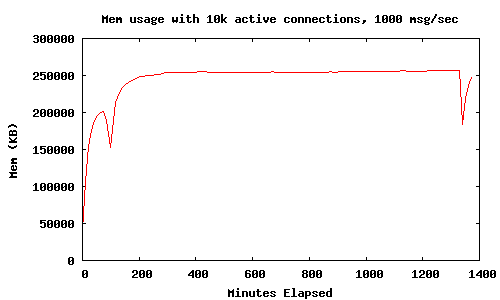
This graph shows the memory usage (with 10k active connections and 1000 msgs/sec) levels off at around 250MB over a 24 hour period. The two big drops, once near the start and once at the end of the test, are when I ran this in the mochiweb erlang process, just out of curiosity:
[erlang:garbage_collect(P) || P <- erlang:processes()].
This forces all processes to garbage collect, and reclaimed around 100MB of memory - next up we investigate ways to save memory without resorting to manually forcing garbage collection.
Reducing memory usage in mochiweb
Seeing as the mochiweb app is just sending messages and then immediately forgetting them, the memory usage shouldn’t need to increase with the number of messages sent.
I’m a novice when it comes to Erlang memory management, but I’m going to assume that if I can force it to garbage collect more often, it will allow us to reclaim much of that memory, and ultimately let us serve more users with less overall system memory. We might burn a bit more CPU in the process, but that’s an acceptable trade-off.
Digging around in the erlang docs yields this option:
erlang:system_flag(fullsweep_after, Number)
Number is a non-negative integer which indicates how many times generational garbages collections can be done without forcing a fullsweep collection. The value applies to new processes; processes already running are not affected. In low-memory systems (especially without virtual memory), setting the value to 0 can help to conserve memory. An alternative way to set this value is through the (operating system) environment variable ERL_FULLSWEEP_AFTER.
Sounds intriguing, but it only applies to new processes and would affect all processes in the VM, not just our mochiweb processes.
Next up is this:
erlang:system_flag(min_heap_size, MinHeapSize)
Sets the default minimum heap size for processes. The size is given in words. The new min_heap_size only effects processes spawned after the change of min_heap_size has been made. The min_heap_size can be set for individual processes by use of spawn_opt/N or process_flag/2.
Could be useful, but I’m pretty sure our mochiweb processes need a bigger heap than the default value anyway. I’d like to avoid needing to patch the mochiweb source to add spawn options if possible.
Next to catch my eye was this:
erlang:hibernate(Module, Function, Args)
Puts the calling process into a wait state where its memory allocation has been reduced as much as possible, which is useful if the process does not expect to receive any messages in the near future. The process will be awaken when a message is sent to it, and control will resume in Module:Function with the arguments given by Args with the call stack emptied, meaning that the process will terminate when that function returns. Thus erlang:hibernate/3 will never return to its caller. If the process has any message in its message queue, the process will be awaken immediately in the same way as described above. In more technical terms, what erlang:hibernate/3 does is the following. It discards the call stack for the process. Then it garbage collects the process. After the garbage collection, all live data is in one continuous heap. The heap is then shrunken to the exact same size as the live data which it holds (even if that size is less than the minimum heap size for the process). If the size of the live data in the process is less than the minimum heap size, the first garbage collection occurring after the process has been awaken will ensure that the heap size is changed to a size not smaller than the minimum heap size. Note that emptying the call stack means that any surrounding catch is removed and has to be re-inserted after hibernation. One effect of this is that processes started using proc_lib (also indirectly, such as gen_server processes), should use proc_lib:hibernate/3 instead to ensure that the exception handler continues to work when the process wakes up.
This sounds reasonable - let’s try hibernating after every message and see what happens.
Edit mochiconntest_web.erl and change the following:
- Make the last line of the
feed(Response, Id, N)function call hibernate instead of calling itself - Call hibernate immediately after logging into the router, rather than calling
feedand blocking on receive - Remember to export
feed/3so hibernate can call back into the function on wake-up
Updated mochiconntest_web.erl with hibernation between messages:
-module(mochiconntest_web).

-export([start/1, stop/0, loop/2, feed/3]).

%% External API

start(Options) ->
    {DocRoot, Options1} = get_option(docroot, Options),
    Loop = fun (Req) ->
                   ?MODULE:loop(Req, DocRoot)
           end,
    % we'll set our maximum to 1 million connections. (default: 2048)
    mochiweb_http:start([{max, 1000000}, {name, ?MODULE}, {loop, Loop} | Options1]).

stop() ->
    mochiweb_http:stop(?MODULE).

loop(Req, DocRoot) ->
    "/" ++ Path = Req:get(path),
    case Req:get(method) of
        Method when Method =:= 'GET'; Method =:= 'HEAD' ->
            case Path of
                "test/" ++ IdStr ->
                    Response = Req:ok({"text/html; charset=utf-8",
                                      [{"Server","Mochiweb-Test"}],
                                      chunked}),
                    {Id, _} = string:to_integer(IdStr),
                    router:login(Id, self()),
                    % Hibernate this process until it receives a message:
                    proc_lib:hibernate(?MODULE, feed, [Response, Id, 1]);
                _ ->


                    Req:not_found()
            end;
        'POST' ->
            case Path of
                _ ->
                    Req:not_found()
            end;
        _ ->
            Req:respond({501, [], []})
    end.

feed(Response, Id, N) ->
    receive
    {router_msg, Msg} ->
        Html = io_lib:format("Recvd msg #~w: '~w'<br/>", [N, Msg]),
        Response:write_chunk(Html)
    end,
    % Hibernate this process until it receives a message:
    proc_lib:hibernate(?MODULE, feed, [Response, Id, N+1]).


%% Internal API

get_option(Option, Options) ->
    {proplists:get_value(Option, Options), proplists:delete(Option, Options)}.
I made these changes, ran make to rebuild mochiweb, then redid the same c10k test (1000msgs/sec for 24hrs).
Results after running for 24 hours w/ proc_lib:hibernate()
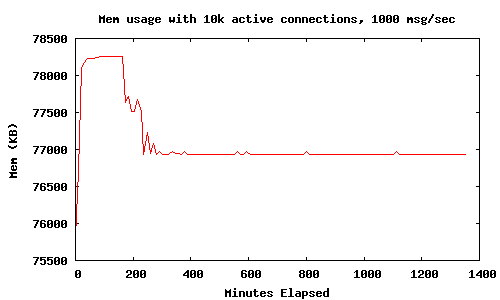
Judicious use of hibernate means the mochiweb application memory levels out at 78MB Resident with 10k connections, much better than the 450MB we saw in Part 1. There was no significant increase in CPU usage.
Summary
We made a comet application on Mochiweb that lets us push arbitrary messages to users identified by an integer ID. After pumping 1000 msgs/sec through it for 24 hours, with 10,000 connected users, we observed it using 80MB, or 8KB per user. We even made pretty graphs.
This is quite an improvement from the 45KB per used we saw in Part 1. The savings are attributed to making the application behave in a more realistic way, and use of hibernate for mochiweb processes between messages.
Next Steps
In Part 3, I’ll turn it up to 1 million connected clients. I will be deploying the test app on a multi-cpu 64-bit server with plenty of RAM. This will show what difference, if any, running on a 64-bit VM makes. I’ll also detail some additional tricks and tuning needed in order to simulate 1 million client connections.
The application will evolve into a sort of pub-sub system, where subscriptions are associated to user Ids and stored by the app, rather than provided by clients when they connect. We’ll load in a typical social-network dataset: friends. This will allow a user to login with their user Id and automatically receive any event generated by one of their friends.
UPDATE: Next article is online
Turning it up to 1 million in Part 3.