
In Part 1 and Part 2 of this series we built a comet application using mochiweb, and learned how to route messages to connected users. We managed to squeeze application memory down to 8KB per connection. We did ye olde c10k test, and observed what happened with 10,000 connected users. We made graphs. It was fun, but now it’s time to make good on the claims made in the title, and turn it up to 1 million connections.
This post covers the following:
- Add a pubsub-like subscription database using Mnesia
- Generate a realistic friends dataset for a million users
- Tune mnesia and bulk load in our friends data
- Opening a million connections from one machine
- Benchmark with 1 Million connected users
- Libevent + C for connection handling
- Final thoughts
One of the challenging parts of this test was actually being able to open 1M connections from a single test machine. Writing a server to accept 1M connections is easier than actually creating 1M connections to test it with, so a fair amount of this article is about the techniques used to open 1M connections from a single machine.
Getting our pubsub on
In Part 2 we used the router to send messages to specific users. This is fine for a chat/IM system, but that there are sexier things we could do instead. Before we launch into a large-scale test, let’s add one more module - a subscription database. We want the application store who your friends are, so it can push you all events generated by people on your friends list.
My intention is to use this for Last.fm so I can get a realtime feed of songs my friends are currently listening to. It could equally apply to other events generated on social networks. Flickr photo uploads, Facebook newsfeed items, Twitter messages etc. FriendFeed even have a realtime API in beta, so this kind of thing is definitely topical. (Although I’ve not heard of anyone except Facebook using Erlang for this kind of thing).
Implementing the subscription-manager
We’re implementing a general subscription manager, but we’ll be subscribing people to everyone on their friends list automatically - so you could also think of this as a friends database for now.
The subsmanager API:
- add_subscriptions([{Subscriber, Subscribee},...])
- remove_subscriptions([{Subscriber, Subscribee},...])
- get_subscribers(User)
subsmanager.erl
-module(subsmanager).
-behaviour(gen_server).
-include("/usr/local/lib/erlang/lib/stdlib-1.15.4/include/qlc.hrl").
-export([init/1, handle_call/3, handle_cast/2, handle_info/2, terminate/2, code_change/3]).
-export([add_subscriptions/1,
         remove_subscriptions/1,
         get_subscribers/1,
         first_run/0,
         stop/0,
         start_link/0]).
-record(subscription, {subscriber, subscribee}).
-record(state, {}). % state is all in mnesia
-define(SERVER, global:whereis_name(?MODULE)).

start_link() ->
    gen_server:start_link({global, ?MODULE}, ?MODULE, [], []).

stop() ->
    gen_server:call(?SERVER, {stop}).

add_subscriptions(SubsList) ->
    gen_server:call(?SERVER, {add_subscriptions, SubsList}, infinity).

remove_subscriptions(SubsList) ->
    gen_server:call(?SERVER, {remove_subscriptions, SubsList}, infinity).

get_subscribers(User) ->
    gen_server:call(?SERVER, {get_subscribers, User}).

%%

init([]) ->
    ok = mnesia:start(),
    io:format("Waiting on mnesia tables..\n",[]),
    mnesia:wait_for_tables([subscription], 30000),
    Info = mnesia:table_info(subscription, all),
    io:format("OK. Subscription table info: \n~w\n\n",[Info]),
    {ok, #state{} }.

handle_call({stop}, _From, State) ->
    {stop, stop, State};

handle_call({add_subscriptions, SubsList}, _From, State) ->
    % Transactionally is slower:
    % F = fun() ->
    %         [ ok = mnesia:write(S) || S <- SubsList ]
    %     end,
    % mnesia:transaction(F),
    [ mnesia:dirty_write(S) || S <- SubsList ],
    {reply, ok, State};

handle_call({remove_subscriptions, SubsList}, _From, State) ->
    F = fun() ->
        [ ok = mnesia:delete_object(S) || S <- SubsList ]
    end,
    mnesia:transaction(F),
    {reply, ok, State};

handle_call({get_subscribers, User}, From, State) ->
    F = fun() ->
        Subs = mnesia:dirty_match_object(#subscription{subscriber='_', subscribee=User}),
        Users = [Dude || #subscription{subscriber=Dude, subscribee=_} <- Subs],
        gen_server:reply(From, Users)
    end,
    spawn(F),
    {noreply, State}.

handle_cast(_Msg, State) -> {noreply, State}.
handle_info(_Msg, State) -> {noreply, State}.

terminate(_Reason, _State) ->
    mnesia:stop(),
    ok.

code_change(_OldVersion, State, _Extra) ->
    io:format("Reloading code for ?MODULE\n",[]),
    {ok, State}.

%%

first_run() ->
    mnesia:create_schema([node()]),
    ok = mnesia:start(),
    Ret = mnesia:create_table(subscription,
    [
     {disc_copies, [node()]},
     {attributes, record_info(fields, subscription)},
     {index, [subscribee]}, %index subscribee too
     {type, bag}
    ]),
    Ret.
Noteworthy points:
- I've included qlc.hrl, needed for mnesia queries using list comprehension, using an absolute path. That can't be best practice, it wasn't finding it otherwise though.
get_subscribersspawns another process and delegates the job of replying to that process, usinggen_server:reply. This means the gen_server loop won't block on that call if we throw lots of lookups at it and mnesia slows down.rr(”subsmanager.erl”).in the example below allows you to use record definitions in the erl shell. Putting your record definitions into arecords.hrlfile and including that in your modules is considered better style. I inlined it for brevity.
Now to test it. first_run() creates the mnesia schema, so it’s important to run that first. Another potential gotcha with mnesia is that (by default) the database can only be accessed by the node that created it, so give the erl shell a name, and stick with it.
$ mkdir /var/mnesia
$ erl -boot start_sasl -mnesia dir '"/var/mnesia_data"' -sname subsman
(subsman@localhost)1> c(subsmanager).
{ok,subsmanager}
(subsman@localhost)2> subsmanager:first_run().
...
{atomic,ok}
(subsman@localhost)3> subsmanager:start_link().
Waiting on mnesia tables..
OK. Subscription table info:
...snipped...
{ok,<0.105.0>}
(subsman@localhost)4> rr("subsmanager.erl").
[state,subscription]
(subsman@localhost)5> subsmanager:add_subscriptions([ #subscription{subscriber=alice, subscribee=rj} ]).
ok
(subsman@localhost)6> subsmanager:add_subscriptions([ #subscription{subscriber=bob, subscribee=rj} ]).
ok
(subsman@localhost)7> subsmanager:get_subscribers(rj).
[bob,alice]
(subsman@localhost)8> subsmanager:remove_subscriptions([ #subscription{subscriber=bob, subscribee=rj} ]).
ok
(subsman@localhost)9> subsmanager:get_subscribers(rj).
[alice]
(subsman@localhost)10> subsmanager:get_subscribers(charlie).
[]
We’ll use integer Ids to represent users for the benchmark - but for this test I used atoms (rj, alice, bob) and assumed that alice and bob are both on rj’s friends list. It’s nice that mnesia (and ets/dets) doesn’t care what values you use - any Erlang term is valid. This means it’s a simple upgrade to support multiple types of resource. You could start using {user, 123} or {photo, 789} to represent different things people might subscribe to, without changing anything in the subsmanager module.
Modifying the router to use subscriptions
Instead of addressing messages to specific users, ie router:send(123, "Hello user 123"), we’ll mark messages with a subject - that is, the person who generated the message (who played the song, who uploaded the photo etc) - and have the router deliver the message to every user who has subscribed to the subject user. In other words, the API will work like this: router:send(123, "Hello everyone subscribed to user 123")
Updated router.erl:
-module(router).
-behaviour(gen_server).

-export([start_link/0]).
-export([init/1, handle_call/3, handle_cast/2, handle_info/2,
     terminate/2, code_change/3]).

-export([send/2, login/2, logout/1]).

-define(SERVER, global:whereis_name(?MODULE)).

% will hold bidirectional mapping between id <--> pid
-record(state, {pid2id, id2pid}).

start_link() ->
    gen_server:start_link({global, ?MODULE}, ?MODULE, [], []).

% sends Msg to anyone subscribed to Id
send(Id, Msg) ->
    gen_server:call(?SERVER, {send, Id, Msg}).

login(Id, Pid) when is_pid(Pid) ->
    gen_server:call(?SERVER, {login, Id, Pid}).

logout(Pid) when is_pid(Pid) ->
    gen_server:call(?SERVER, {logout, Pid}).

%%

init([]) ->
    % set this so we can catch death of logged in pids:
    process_flag(trap_exit, true),
    % use ets for routing tables
    {ok, #state{
                pid2id = ets:new(?MODULE, [bag]),
                id2pid = ets:new(?MODULE, [bag])
               }
    }.

handle_call({login, Id, Pid}, _From, State) when is_pid(Pid) ->
    ets:insert(State#state.pid2id, {Pid, Id}),
    ets:insert(State#state.id2pid, {Id, Pid}),
    link(Pid), % tell us if they exit, so we can log them out
    %io:format("~w logged in as ~w\n",[Pid, Id]),
    {reply, ok, State};

handle_call({logout, Pid}, _From, State) when is_pid(Pid) ->
    unlink(Pid),
    PidRows = ets:lookup(State#state.pid2id, Pid),
    case PidRows of
        [] ->
            ok;
        _ ->
            IdRows = [ {I,P} || {P,I} <- PidRows ], % invert tuples
            ets:delete(State#state.pid2id, Pid),   % delete all pid->id entries
            [ ets:delete_object(State#state.id2pid, Obj) || Obj <- IdRows ] % and all id->pid
    end,
    %io:format("pid ~w logged out\n",[Pid]),
    {reply, ok, State};

handle_call({send, Id, Msg}, From, State) ->
    F = fun() ->
        % get users who are subscribed to Id:
        Users = subsmanager:get_subscribers(Id),
        io:format("Subscribers of ~w = ~w\n",[Id, Users]),
        % get pids of anyone logged in from Users list:
        Pids0 = lists:map(
            fun(U)->
                [ P || { _I, P } <- ets:lookup(State#state.id2pid, U) ]
            end,
            [ Id | Users ] % we are always subscribed to ourselves
        ),
        Pids = lists:flatten(Pids0),
        io:format("Pids: ~w\n", [Pids]),
        % send Msg to them all
        M = {router_msg, Msg},
        [ Pid ! M || Pid <- Pids ],
        % respond with how many users saw the message
        gen_server:reply(From, {ok, length(Pids)})
    end,
    spawn(F),
    {noreply, State}.

% handle death and cleanup of logged in processes
handle_info(Info, State) ->
    case Info of
        {'EXIT', Pid, _Why} ->
            handle_call({logout, Pid}, blah, State);
        Wtf ->
            io:format("Caught unhandled message: ~w\n", [Wtf])
    end,
    {noreply, State}.

handle_cast(_Msg, State) ->
    {noreply, State}.
terminate(_Reason, _State) ->
    ok.
code_change(_OldVsn, State, _Extra) ->
    {ok, State}.
And here’s a quick test that doesn’t require mochiweb - I’ve used atoms instead of user ids, and omitted some output for clarity:
(subsman@localhost)1> c(subsmanager), c(router), rr("subsmanager.erl").
(subsman@localhost)2> subsmanager:start_link().
(subsman@localhost)3> router:start_link().
(subsman@localhost)4> Subs = [#subscription{subscriber=alice, subscribee=rj}, #subscription{subscriber=bob, subscribee=rj}].
[#subscription{subscriber = alice,subscribee = rj},
#subscription{subscriber = bob,subscribee = rj}]
(subsman@localhost)5> subsmanager:add_subscriptions(Subs).
ok
(subsman@localhost)6> router:send(rj, "RJ did something").
Subscribers of rj = [bob,alice]
Pids: []
{ok,0}
(subsman@localhost)7> router:login(alice, self()).
ok
(subsman@localhost)8> router:send(rj, "RJ did something").
Subscribers of rj = [bob,alice]
Pids: [<0.46.0>]
{ok,1}
(subsman@localhost)9> receive {router_msg, M} -> io:format("~s\n",[M]) end.
RJ did something
ok
This shows how alice can a receive a message when the subject is someone she is subscribed to (rj), even though the message wasn’t sent directly to alice. The output shows that the router identified possible targets as [alice,bob] but only delivered the message to one person, alice, because bob was not logged in.
Generating a typical social-network friends dataset
We could generate lots of friend relationships at random, but that’s not particularly realistic. Social networks tend to exhibit a power law distribution. Social networks usually have a few super-popular users (some Twitter users have over 100,000 followers) and plenty of people with just a handful of friends. The Last.fm friends data is typical - it fits a Barabási–Albert graph model, so that’s what I’ll use.
To generate the dataset I’m using the python module from the excellent igraph library:
fakefriends.py:
import igraph
g = igraph.Graph.Barabasi(1000000, 15, directed=False)
print "Edges: " + str(g.ecount()) + " Verticies: " + str(g.vcount())
g.write_edgelist("fakefriends.txt")
This will generate with 2 user ids per line, space separated. These are the friend relationships we’ll load into our subsmanager. User ids range from 1 to a million.
Bulk loading friends data into mnesia
This small module will read the fakefriends.txt file and create a list of subscription records.
readfriends.erl - to read the fakefriends.txt and create subscription records:
-module(readfriends).
-export([load/1]).
-record(subscription, {subscriber, subscribee}).

load(Filename) ->
    for_each_line_in_file(Filename,
        fun(Line, Acc) ->
            [As, Bs] = string:tokens(string:strip(Line, right, $\n), " "),
            {A, _} = string:to_integer(As),
            {B, _} = string:to_integer(Bs),
            [ #subscription{subscriber=A, subscribee=B} | Acc ]
        end, [read], []).

% via: http://www.trapexit.org/Reading_Lines_from_a_File
for_each_line_in_file(Name, Proc, Mode, Accum0) ->
    {ok, Device} = file:open(Name, Mode),
    for_each_line(Device, Proc, Accum0).

for_each_line(Device, Proc, Accum) ->
    case io:get_line(Device, "") of
        eof  -> file:close(Device), Accum;
        Line -> NewAccum = Proc(Line, Accum),
                    for_each_line(Device, Proc, NewAccum)
    end.
Now in the subsmanager shell, you can read from the text file and add the subscriptions:
$ erl -name router@minifeeds4.gs2 +K true +A 128 -setcookie secretcookie -mnesia dump_log_write_threshold 50000 -mnesia dc_dump_limit 40
erl> c(readfriends), c(subsmanager).
erl> subsmanager:first_run().
erl> subsmanager:start_link().
erl> subsmanager:add_subscriptions( readfriends:load("fakefriends.txt") ).
Note the additional mnesia parameters - these are to avoid the ** WARNING ** Mnesia is overloaded messages you would (probably) otherwise see. Refer to my previous post: On bulk loading data into Mnesia for alternative ways to load in lots of data. The best solution seems to be (as pointed out in the comments, thanks Jacob!) to set those options. The Mnesia reference manual contains many other settings under Configuration Parameters, and is worth a look.
Turning it up to 1 Million
Creating a million tcp connections from one host is non-trivial. I’ve a feeling that people who do this regularly have small clusters dedicated to simulating lots of client connections, probably running a real tool like Tsung. Even with the tuning from Part 1 to increase kernel tcp memory, increase the file descriptor ulimits and set the local port range to the maximum, we will still hit a hard limit on ephemeral ports.
When making a tcp connection, the client end is allocated (or you can specify) a port from the range in /proc/sys/net/ipv4/ip_local_port_range. It doesn’t matter if you specify it manually, or use an ephemeral port, you’re still going to run out.
In Part 1, we set the range to “1024 65535” - meaning there are 65535-1024 = 64511 unprivileged ports available. Some of them will be used by other processes, but we’ll never get over 64511 client connections, because we’ll run out of ports.
The local port range is assigned per-IP, so if we make our outgoing connections specifically from a range of different local IP addresses, we’ll be able to open more than 64511 outgoing connections in total.
So let’s bring up 17 new IP addresses, with the intention of making 62,000 connections from each - giving us a total of 1,054,000 connections:
$ for i in `seq 1 17`; do echo sudo ifconfig eth0:$i 10.0.0.$i up ; done
If you run ifconfig now you should see your virtual interfaces: eth0:1, eth0:2 … eth0:17, each with a different IP address. Obviously you should chose a sensible part of whatever address space you are using.
All that remains now is to modify the floodtest tool from Part 1 to specify the local IP it should connect from… Unfortunately the erlang http client doesn’t let you specify the source IP. Neither does ibrowse, the alternative http client library. Damn.
Crazy Idea.. At this point I considered another option: bringing up 17 pairs of IPs - one on the server and one on the client - each pair in their own isolated /30 subnet. I think that if I then made the client connect to any given server IP, it would force the local address to be other half of the pair on that subnet, because only one of the local IPs would actually be able to reach the server IP. In theory, this would mean declaring the local source IP on the client machine would not be necessary (although the range of server IPs would need to be specified). I don’t know if this would really work - it sounded plausible at the time. In the end I decided it was too perverted and didn’t try it.
I also poked around in OTP’s http_transport code and considered adding support for specifying the local IP. It’s not really a feature you usually need in an HTTP client though, and it would certainly have been more work.
Note: gen_tcp lets you specify the source address, so I ended up writing a rather crude client using gen_tcp specifically for this test:
floodtest2.erl
-module(floodtest2).
-compile(export_all).
-define(SERVERADDR, "10.1.2.3"). % where mochiweb is running
-define(SERVERPORT, 8000).

% Generate the config in bash like so (chose some available address space):
% EACH=62000; for i in `seq 1 17`; do echo "{ {10,0,0,$i}, $((($i-1)*$EACH+1)), $(($i*$EACH)) }, "; done

run(Interval) ->
        Config = [
{ {10,0,0,1}, 1, 62000},
{ {10,0,0,2}, 62001, 124000},
{ {10,0,0,3}, 124001, 186000},
{ {10,0,0,4}, 186001, 248000},
{ {10,0,0,5}, 248001, 310000},
{ {10,0,0,6}, 310001, 372000},
{ {10,0,0,7}, 372001, 434000},
{ {10,0,0,8}, 434001, 496000},
{ {10,0,0,9}, 496001, 558000},
{ {10,0,0,10}, 558001, 620000},
{ {10,0,0,11}, 620001, 682000},
{ {10,0,0,12}, 682001, 744000},
{ {10,0,0,13}, 744001, 806000},
{ {10,0,0,14}, 806001, 868000},
{ {10,0,0,15}, 868001, 930000},
{ {10,0,0,16}, 930001, 992000},
{ {10,0,0,17}, 992001, 1054000}],
        start(Config, Interval).

start(Config, Interval) ->
        Monitor = monitor(),
        AdjustedInterval = Interval / length(Config),
        [ spawn(fun start/5, [Lower, Upper, Ip, AdjustedInterval, Monitor])
          || {Ip, Lower, Upper}  <- Config ],
        ok.

start(LowerID, UpperID, _, _, _) when LowerID == UpperID -> done;
start(LowerID, UpperID, LocalIP, Interval, Monitor) ->
        spawn(fun connect/5, [?SERVERADDR, ?SERVERPORT, LocalIP, "/test/"++LowerID, Monitor]),
        receive after Interval -> start(LowerID + 1, UpperID, LocalIP, Interval, Monitor) end.

connect(ServerAddr, ServerPort, ClientIP, Path, Monitor) ->
        Opts = [binary, {packet, 0}, {ip, ClientIP}, {reuseaddr, true}, {active, false}],
        {ok, Sock} = gen_tcp:connect(ServerAddr, ServerPort, Opts),
        Monitor ! open,
        ReqL = io_lib:format("GET ~s\r\nHost: ~s\r\n\r\n", [Path, ServerAddr]),
        Req = list_to_binary(ReqL),
        ok = gen_tcp:send(Sock, [Req]),
        do_recv(Sock, Monitor),
        (catch gen_tcp:close(Sock)),
        ok.

do_recv(Sock, Monitor)->
        case gen_tcp:recv(Sock, 0) of
                {ok, B} ->
                        Monitor ! {bytes, size(B)},
                        io:format("Recvd ~s\n", [ binary_to_list(B)]),
                        io:format("Recvd ~w bytes\n", [size(B)]),
                        do_recv(Sock, Monitor);
                {error, closed} ->
                        Monitor ! closed,
                        closed;
                Other ->
                        Monitor ! closed,
                        io:format("Other:~w\n",[Other])
        end.

% Monitor process receives stats and reports how much data we received etc:
monitor() ->
        Pid = spawn(?MODULE, monitor0, [{0,0,0,0}]),
        timer:send_interval(10000, Pid, report),
        Pid.

monitor0({Open, Closed, Chunks, Bytes}=S) ->
        receive
                report  -> io:format("{Open, Closed, Chunks, Bytes} = ~w\n",[S]);
                open    -> monitor0({Open + 1, Closed, Chunks, Bytes});
                closed  -> monitor0({Open, Closed + 1, Chunks, Bytes});
                chunk   -> monitor0({Open, Closed, Chunks + 1, Bytes});
                {bytes, B} -> monitor0({Open, Closed, Chunks, Bytes + B})
        end.
As an initial test I was connecting to the mochiweb app from Part 1 - it simply sends one message to every client every 10 seconds.
erl> c(floodtest2), floodtest2:run(20).
This quickly ate all my memory.
Turns out opening lots of connections with gen_tcp like that eats a lot of ram. I think it’d need ~36GB to make it work without any additional tuning. I’m not interested in trying to optimise my quick-hack erlang http client (in the real world, this would be 1M actual web browsers), and the only machine I could get my hands on that has more than 32GB of RAM is one of our production databases, and I can’t find a good excuse to take Last.fm offline whilst I test this :) Additionally, it seems like it still only managed to open around 64,500 ports. Hmm.
At this point I decided to break out the trusty libevent, which I was pleased to discover has an HTTP API. Newer versions also have a evhttp_connection_set_local_address function in the http API. This sounds promising.
Here’s the http client in C using libevent:
#include <sys/types.h>
#include <sys/time.h>
#include <sys/queue.h>
#include <stdlib.h>
#include <err.h>
#include <event.h>
#include <evhttp.h>
#include <unistd.h>
#include <stdio.h>
#include <sys/socket.h>
#include <netinet/in.h>
#include <time.h>
#include <pthread.h>

#define BUFSIZE 4096
#define NUMCONNS 62000
#define SERVERADDR "10.103.1.43"
#define SERVERPORT 8000
#define SLEEP_MS 10

char buf[BUFSIZE];

int bytes_recvd = 0;
int chunks_recvd = 0;
int closed = 0;
int connected = 0;

// called per chunk received
void chunkcb(struct evhttp_request * req, void * arg)
{
    int s = evbuffer_remove( req->input_buffer, &buf, BUFSIZE );
    //printf("Read %d bytes: %s\n", s, &buf);
    bytes_recvd += s;
    chunks_recvd++;
    if(connected >= NUMCONNS && chunks_recvd%10000==0)
        printf(">Chunks: %d\tBytes: %d\tClosed: %d\n", chunks_recvd, bytes_recvd, closed);
}

// gets called when request completes
void reqcb(struct evhttp_request * req, void * arg)
{
    closed++;
}

int main(int argc, char **argv)
{
    event_init();
    struct evhttp *evhttp_connection;
    struct evhttp_request *evhttp_request;
    char addr[16];
    char path[32]; // eg: "/test/123"
    int i,octet;
    for(octet=1; octet<=17; octet++){
        sprintf(&addr, "10.224.0.%d", octet);
        for(i=1;i<=NUMCONNS;i++) {
            evhttp_connection = evhttp_connection_new(SERVERADDR, SERVERPORT);
            evhttp_connection_set_local_address(evhttp_connection, &addr);
            evhttp_set_timeout(evhttp_connection, 864000); // 10 day timeout
            evhttp_request = evhttp_request_new(reqcb, NULL);
            evhttp_request->chunk_cb = chunkcb;
            sprintf(&path, "/test/%d", ++connected);
            if(i%100==0)  printf("Req: %s\t->\t%s\n", addr, &path);
            evhttp_make_request( evhttp_connection, evhttp_request, EVHTTP_REQ_GET, path );
            evhttp_connection_set_timeout(evhttp_request->evcon, 864000);
            event_loop( EVLOOP_NONBLOCK );
            if( connected % 200 == 0 )
                printf("\nChunks: %d\tBytes: %d\tClosed: %d\n", chunks_recvd, bytes_recvd, closed);
            usleep(SLEEP_MS*1000);
        }
    }
    event_dispatch();
    return 0;
}
Most parameters are hardcoded as #define’s so you configure it by editing the source and recompiling.
Compile and run:
$ gcc -o httpclient httpclient.c -levent
$ ./httpclient
This still failed to open more than 64,500 ports. Although it used less RAM doing it.
It turns out that although I was specifying the local addresses, the ephemeral port allocation somewhere in the kernel or tcp stack didn’t care, and still ran out after 2^16. So in order to open more than 64,500 connections, you need to specify the local address and local port yourself, and manage them accordingly.
Unfortunately the libevent HTTP API doesn’t have an option to specify the local port. I patched libevent to add a suitable function:
diff libevent-1.4.8-stable/evhttp.h libevent-1.4.8-stable-rj-clean/evhttp.h
269a270,273
> /** sets the local port from which http connections are made */
> void evhttp_connection_set_local_port(struct evhttp_connection *evcon,
>     u_short port);
>
diff libevent-1.4.8-stable/http.c libevent-1.4.8-stable-rj-clean/http.c
1040a1041,1048
> void
> evhttp_connection_set_local_port(struct evhttp_connection *evcon,
>     u_short port)
> {
>       assert(evcon->state == EVCON_DISCONNECTED);
>     evcon->bind_port = port;
> }
>
1654a1663
>     evcon->bind_port = 0; /* by default, use ephemeral local port */
1734c1743
<       evcon->fd = bind_socket(evcon->bind_address, 0 /*port*/, 0 /*reuse*/);
---
>       evcon->fd = bind_socket(evcon->bind_address, evcon->bind_port, 0 /*reuse*/);
diff libevent-1.4.8-stable/http-internal.h libevent-1.4.8-stable-rj-clean/http-internal.h
63a64
>       u_short bind_port;      /* port to use for binding the src */
This was a surprisingly pleasant experience; libevent seems well written, and the documentation is pretty decent too.
With my modified libevent installed, I was able to add the following under the set_local_address line in the above code:
evhttp_connection_set_local_port(evhttp_connection, 1024+i);
With that in place, multiple connections from different addresses were able to use the same local port number, specific to the the local address. I recompiled the client and let it run for a bit to confirm it would break the 2^16 barrier.
Netstat confirms it:
# netstat -n | awk '/^tcp/ {t[$NF]++}END{for(state in t){print state, t[state]} }'
TIME_WAIT 8
ESTABLISHED 118222
This shows how many ports are open in various states. We’re finally able to open more than 2^16 connections, phew.
Now we have a tool capable of opening a million http connections from a single box. It seems to consume around 2KB per connection, plus whatever the kernel needs. It’s time to use it for the “million connected user” test against our mochiweb comet server.
C1024K Test - 1 million comet connections
For this test I used 4 different servers of varying specs. These specs may be overpowered for the experiment, but they were available and waiting to go into production, and this made a good burn-in test. All four servers are on the same gigabit LAN, with up to 3 switches and a router in the middle somewhere.
The 1 million test I ran is similar to the 10k test from parts 1 and 2, the main difference being the modified client, now written in C using libevent, and that I’m running in a proper distributed-erlang setup with more than one machine.
On server 1 - Quad-core 2GHz CPU, 16GB of RAM
- Start subsmanager
- Load in the friends data
- Start the router
On server 2 - Dual Quad-core 2.8GHz CPU, 32GB of RAM
- Start mochiweb app
On server 3 - Quad-core 2GHz CPU, 16GB of RAM
- Create 17 virtual IPs as above
- Install patched libevent
- Run client:
./httpclientto create 100 connections per second, up to 1M
On server 4 - Dual-core 2GHz, 2GB RAM
- Run msggen program, to send lots of messages to the router
I measured the memory usage of mochiweb during the ramp-up to a million connections, and for the rest of the day:
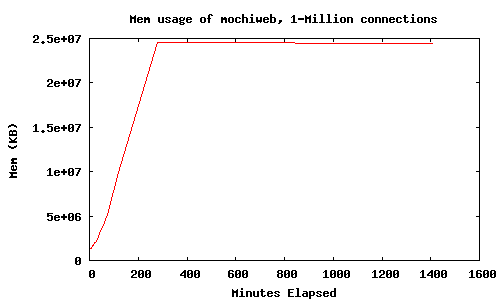
The httpclient has a built in delay of 10ms between connections, so it took nearly 3 hours to open a million connections. The resident memory used by the mochiweb process with 1M open connections was around 25GB. Here’s the server this was running on as seen by Ganglia, which measures CPU, network and memory usage and produces nice graphs:
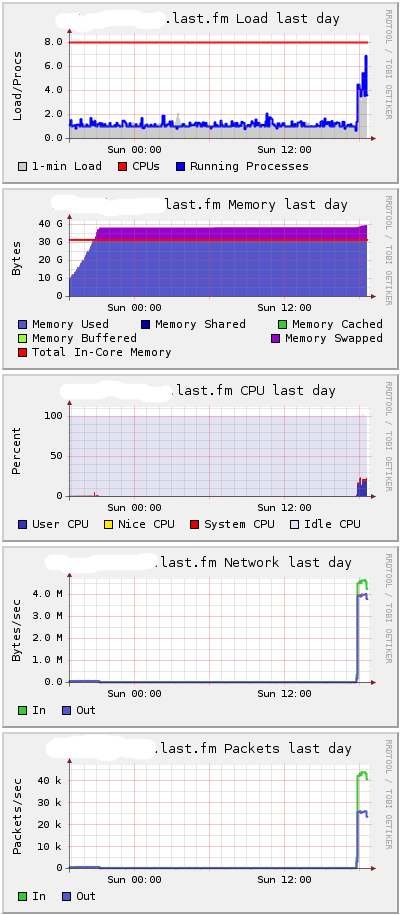
You can see it needs around 38GB and has started to swap. I suspect the difference is mostly consumed by the kernel to keep those connections open. The uplift at the end is when I started sending messages.
Messages were generated using 1,000 processes, with an average time between messages of 60ms per process, giving around 16,666 messages per second overall:
[ spawn( fun()->msggen:start(1000000, 10+random:uniform(100), 1000000) end) || I <- lists:seq(1,1000) ].
The machine (server-4) generating messages looked like this on Ganglia:
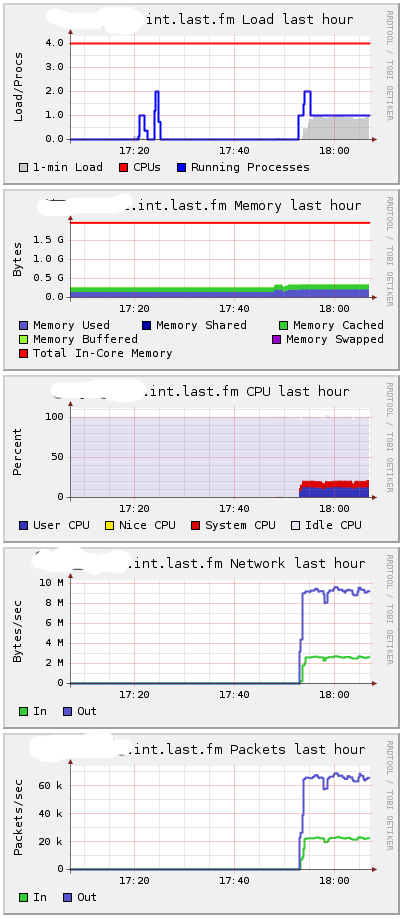
That’s 10 MB per second of messages it’s pumping out - 16,666 messages a second. Typically these messages would come from a message bus, app servers, or part of an existing infrastructure.
When I started sending messages, the load on server 1 (hosting subsmanager and router) stayed below 1, and CPU utilization increased from 0 to 5%.
CPU on server 2 (hosting mochiweb app, with 1M connections) increased more dramatically:
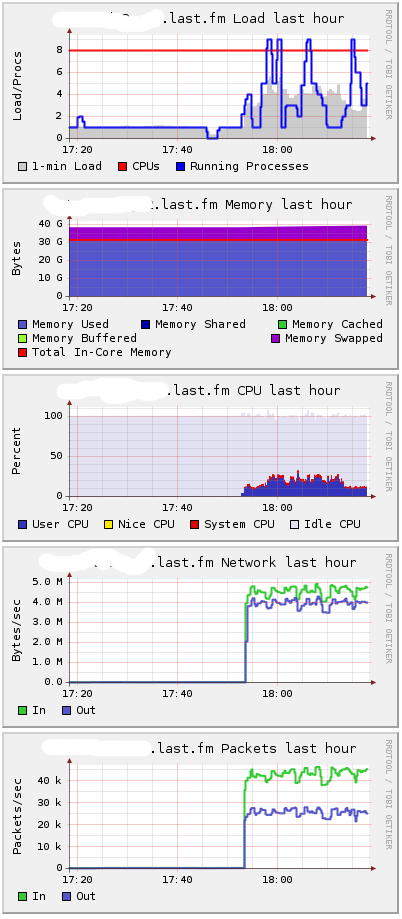
Naturally as processes have to leave their hibernate state to handle messages, memory usage will increase slightly. Having all connections open with no messages is a best-case for memory usage - unsurprisingly, actually doing stuff requires more memory.
So where does this leave us? To be on the safe side, the mochiweb machine would need 40GB of RAM to hold open 1M active comet connections. Under load, up to 30GB of the memory would be used by the mochiweb app, and the remaining 10GB by the kernel. In other words, you need to allow 40KB per connection.
During various test with lots of connections, I ended up making some additional changes to my sysctl.conf. This was part trial-and-error, I don’t really know enough about the internals to make especially informed decisions about which values to change. My policy was to wait for things to break, check /var/log/kern.log and see what mysterious error was reported, then increase stuff that sounded sensible after a spot of googling. Here are the settings in place during the above test:
$ cat /etc/sysctl.conf
net.core.rmem_max = 33554432
net.core.wmem_max = 33554432
net.ipv4.tcp_rmem = 4096 16384 33554432
net.ipv4.tcp_wmem = 4096 16384 33554432
net.ipv4.tcp_mem = 786432 1048576 26777216
net.ipv4.tcp_max_tw_buckets = 360000
net.core.netdev_max_backlog = 2500
vm.min_free_kbytes = 65536
vm.swappiness = 0
net.ipv4.ip_local_port_range = 1024 65535
I would like to learn more about Linux tcp tuning so I can make a more informed decision about these settings. These are almost certainly not optimal, but at least they were enough to get to 1M connections. These changes, along with the fact this is running on a 64bit Erlang VM, and thus has a wordsize of 8bytes instead of 4, might explain why the memory usage is much higher than I observed during the C10k test of part 2.
An Erlang C-Node using Libevent
After dabbling with the HTTP api for libevent, it seemed entirely sensible to try the 1M connection test against a libevent HTTPd written in C so we have a basis for comparison.
I’m guessing that enabling kernel poll means the erlang VM is able to use epoll (or similar), but even so there’s clearly some overhead involved which we might be able to mitigate by delegating the connection handling to a C program using libevent. I want to reuse most of the Erlang code so far, so let’s do the bare minimum in C - just the connection handling and HTTP stuff.
Libevent has an asynchronous HTTP API, which makes implementing http servers trivial - well, trivial for C, but still less trivial than mochiweb IMO ;) I’d also been looking for an excuse to try the Erlang C interface, so the following program combines the two. It’s a comet http server in C using libevent which identifies users using an integer Id (like our mochiweb app), and also acts as an Erlang C-Node.
It connects to a designated erlang node, listens for messages like { 123, <<"Hello user 123">> } then dispatches “Hello user 123” to user 123, if connected. Messages for users that are not connected are discarded, just like previous examples.
httpdcnode.c
#include <sys/types.h>
#include <sys/time.h>
#include <sys/queue.h>
#include <stdlib.h>
#include <err.h>
#include <event.h>
#include <evhttp.h>
#include <stdio.h>
#include <sys/socket.h>
#include <netinet/in.h>

#include "erl_interface.h"
#include "ei.h"

#include <pthread.h>

#define BUFSIZE 1024
#define MAXUSERS (17*65536) // C1024K

// List of current http requests by uid:
struct evhttp_request * clients[MAXUSERS+1];
// Memory to store uids passed to the cleanup callback:
int slots[MAXUSERS+1];

// called when user disconnects
void cleanup(struct evhttp_connection *evcon, void *arg)
{
    int *uidp = (int *) arg;
    fprintf(stderr, "disconnected uid %d\n", *uidp);
    clients[*uidp] = NULL;
}

// handles http connections, sets them up for chunked transfer,
// extracts the user id and registers in the global connection table,
// also sends a welcome chunk.
void request_handler(struct evhttp_request *req, void *arg)
{
        struct evbuffer *buf;
        buf = evbuffer_new();
        if (buf == NULL){
            err(1, "failed to create response buffer");
        }

        evhttp_add_header(req->output_headers, "Content-Type", "text/html; charset=utf-8");

        int uid = -1;
        if(strncmp(evhttp_request_uri(req), "/test/", 6) == 0){
            uid = atoi( 6+evhttp_request_uri(req) );
        }

        if(uid <= 0){
            evbuffer_add_printf(buf, "User id not found, try /test/123 instead");
            evhttp_send_reply(req, HTTP_NOTFOUND, "Not Found", buf);
            evbuffer_free(buf);
            return;
        }

        if(uid > MAXUSERS){
            evbuffer_add_printf(buf, "Max uid allowed is %d", MAXUSERS);
            evhttp_send_reply(req, HTTP_SERVUNAVAIL, "We ran out of numbers", buf);
            evbuffer_free(buf);
            return;
        }

        evhttp_send_reply_start(req, HTTP_OK, "OK");
        // Send welcome chunk:
        evbuffer_add_printf(buf, "Welcome, Url: '%s' Id: %d\n", evhttp_request_uri(req), uid);
        evhttp_send_reply_chunk(req, buf);
        evbuffer_free(buf);

        // put reference into global uid->connection table:
        clients[uid] = req;
        // set close callback
        evhttp_connection_set_closecb( req->evcon, cleanup, &slots[uid] );
}


// runs in a thread - the erlang c-node stuff
// expects msgs like {uid, msg} and sends a a 'msg' chunk to uid if connected
void cnode_run()
{
    int fd;                                  /* fd to Erlang node */
    int got;                                 /* Result of receive */
    unsigned char buf[BUFSIZE];              /* Buffer for incoming message */
    ErlMessage emsg;                         /* Incoming message */

    ETERM *uid, *msg;

    erl_init(NULL, 0);

    if (erl_connect_init(1, "secretcookie", 0) == -1)
        erl_err_quit("erl_connect_init");

    if ((fd = erl_connect("httpdmaster@localhost")) < 0)
        erl_err_quit("erl_connect");

    fprintf(stderr, "Connected to httpdmaster@localhost\n\r");

    struct evbuffer *evbuf;

    while (1) {
        got = erl_receive_msg(fd, buf, BUFSIZE, &emsg);
        if (got == ERL_TICK) {
            continue;
        } else if (got == ERL_ERROR) {
            fprintf(stderr, "ERL_ERROR from erl_receive_msg.\n");
            break;
        } else {
            if (emsg.type == ERL_REG_SEND) {
                // get uid and body data from eg: {123, <<"Hello">>}
                uid = erl_element(1, emsg.msg);
                msg = erl_element(2, emsg.msg);
                int userid = ERL_INT_VALUE(uid);
                char *body = (char *) ERL_BIN_PTR(msg);
                int body_len = ERL_BIN_SIZE(msg);
                // Is this userid connected?
                if(clients[userid]){
                    fprintf(stderr, "Sending %d bytes to uid %d\n", body_len, userid);
                    evbuf = evbuffer_new();
                    evbuffer_add(evbuf, (const void*)body, (size_t) body_len);
                    evhttp_send_reply_chunk(clients[userid], evbuf);
                    evbuffer_free(evbuf);
                }else{
                    fprintf(stderr, "Discarding %d bytes to uid %d - user not connected\n",
                            body_len, userid);
                    // noop
                }
                erl_free_term(emsg.msg);
                erl_free_term(uid);
                erl_free_term(msg);
            }
        }
    }
    // if we got here, erlang connection died.
    // this thread is supposed to run forever
    // TODO - gracefully handle failure / reconnect / etc
    pthread_exit(0);
}

int main(int argc, char **argv)
{
    // Launch the thread that runs the cnode:
    pthread_attr_t tattr;
    pthread_t helper;
    int status;
    pthread_create(&helper, NULL, cnode_run, NULL);

    int i;
    for(i=0;i<=MAXUSERS;i++) slots[i]=i;
    // Launch libevent httpd:
    struct evhttp *httpd;
    event_init();
    httpd = evhttp_start("0.0.0.0", 8000);
    evhttp_set_gencb(httpd, request_handler, NULL);
    event_dispatch();
    // Not reached, event_dispatch() shouldn't return
    evhttp_free(httpd);
    return 0;
}
The maximum number of users is #defined, and similarly to the mochiweb server, it listens on port 8000 and expects users to connect with a path like so: /test/<userid>. Also hardcoded is the name of the erlang node it will connect to in order to receive messages, httpdmaster@localhost, and the erlang cookie, “secretcookie”. Change these accordingly.
Run the erlang node it will connect to first:
$ erl -setcookie secretcookie -sname httpdmaster@localhost
Compile and run like so:
$ gcc -o httpdcnode httpdcnode.c -lerl_interface -lei -levent
$ ./httpdcnode
In the erlang shell, check you can see the hidden c-node:
erl> nodes(hidden).
[c1@localhost]
Now connect in your browser to http://localhost:8000/test/123. You should see the welcome message.
Now back to the erlang shell - send a message to the C node:
erl> {any, c1@localhost} ! {123, <<"Hello Libevent World">>}.
Note that we don’t have a Pid to use, so we use the alternate representation of {procname, node}. We use ‘any’ as the process name, which is ignored by the C-node.
Now you’re able to deliver comet messages via Erlang, but all the http connections are managed by a libevent C program which acts as an Erlang node.
After removing the debug print statements, I connected 1M clients to the httpdcnode server using the same client as above, the machine showed a total of just under 10GB or memory used. The resident memory of the server process was stable at under 2GB:
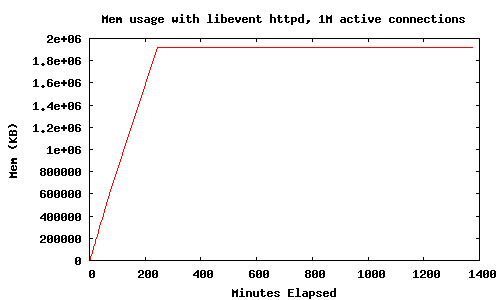
So big savings compared to mochiweb when handling lots of connections - the resident memory per connection for the server process with libevent is just under 2KB. With everything connected, the server machine claims:
Mem: 32968672k total, 9636488k used, 23332184k free, 180k buffers
So the kernel/tcp stack is consuming an additional 8KB per connection, which seems a little high, but I have no basis for comparison.
This libevent-cnode server needs a bit more work. It doesn’t sensibly handle multiple connections from the same user yet, and there’s no locking so a race condition exists if you disconnect at just when a message was going to be dispatched.
Even so, I think this could be generalized in such a way that would allow you to use Erlang for all the interesting stuff, and have a C+libevent process act as a dumb connection-pool. With a bit more wrapper code and callbacks into Erlang, you’d hardly need to know this was going on - the C program could be run as a driver or a C-node, and an Erlang wrapper could give you a decent api built on top of libevent. (see this post for an example Erlang C driver). I would like to experiment further with this.
Final Thoughts
I have enough data now to judge how much hardware would be needed if we deploy a large scale comet system for Last.fm. Even a worst case of 40KB per connection isn’t unreasonable - memory is pretty cheap at the moment, and 40GB to support a million users is not unreasonable. 10GB is even better. I will finish up the app I’m building and deploy it somewhere people can try it out. Along the way I’ll tidy up the erlang memcached client I’m using and release that (from jungerl, with modifications for consistent hashing and some bug fixes), and some other things. Stay tuned :)